The arrival of iOS 26.4 new emojis has given iPhone users something fun to explore. Every major software update from Apple usually includes performance improvements, security fixes, and occasionally a few surprises. This time, the spotlight falls on eight brand-new emojis designed to expand how people communicate.
It may sound simple, but emojis play a huge role in modern messaging. They help express tone, humor, and emotion faster than words. Sometimes, a single emoji can replace an entire paragraph—especially when you’re replying to a message late at night.
The latest update to iOS 26.4 continues that tradition by introducing fresh symbols approved by the Unicode Consortium, the group responsible for standardizing emojis across devices worldwide.
Let’s break down everything you need to know about the iOS 26.4 new emojis, including the full list, meanings, and how to get them on your iPhone.
The 8 New Emojis in iOS 26.4
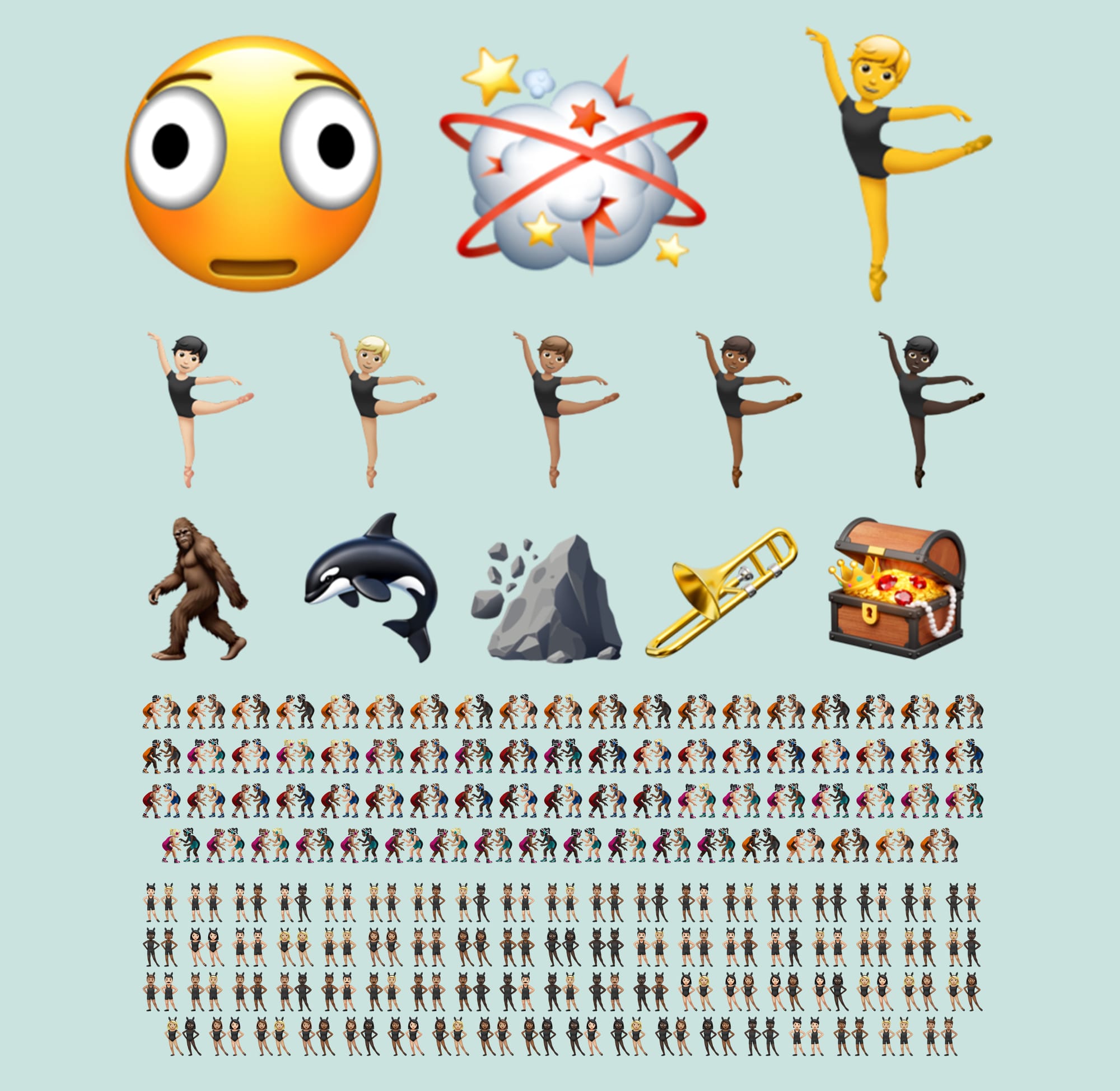
4
The iOS 26.4 new emojis update introduces eight distinct designs that cover emotions, objects, and nature. These emojis work across messaging apps, social media, and email once your device updates.
Full List of New Emojis
- Distorted Face
- Fight Cloud
- Ballet Dancer
- Orca
- Hairy Creature
- Trombone
- Landslide
- Treasure Chest
Each emoji fills a gap in digital communication. Some add humor. Others improve storytelling. All of them expand the emoji language we use every day.
What Each iOS 26.4 New Emoji Represents
Understanding emoji meanings helps avoid confusion and makes conversations clearer.
Distorted Face Emoji
This emoji shows an exaggerated expression of stress or confusion.
People often use it when they feel:
- Overwhelmed
- Shocked
- Frustrated
- Mentally exhausted
It works perfectly for moments when life feels chaotic.
Fight Cloud Emoji
The fight cloud represents action, conflict, or playful chaos.
You might use it when:
- Friends argue jokingly
- A game becomes intense
- Something dramatic happens
It adds humor to conversations without sounding serious.
Ballet Dancer Emoji
This emoji celebrates performance and creativity.
Common uses include:
- Dance classes
- Celebrations
- Fitness activities
- Cultural events
It also promotes artistic expression.
Orca Emoji
The orca symbolizes ocean life and wildlife.
People use it in conversations about:
- Travel
- Marine animals
- Environmental topics
- Nature photography
It adds personality to ocean-themed messages.
Hairy Creature Emoji
This playful emoji resembles a mythical creature.
It often appears in:
- Jokes
- Camping stories
- Halloween messages
- Funny situations
Think of it as the digital version of saying,
“I look wild today.”
Trombone Emoji
Music fans finally have a brass instrument emoji.
This emoji fits perfectly in discussions about:
- Music practice
- School bands
- Concerts
- Performances
It adds rhythm to conversations—literally.
Landslide Emoji
The landslide emoji represents natural disasters and sudden change.
Common uses include:
- Weather alerts
- News updates
- Dramatic situations
- Environmental discussions
It communicates urgency quickly.
Treasure Chest Emoji
This emoji symbolizes reward, discovery, and success.
People often use it when:
- Achieving goals
- Winning prizes
- Finding something valuable
- Celebrating success
It adds excitement to messages.
Why Apple Adds New Emojis Regularly
The addition of iOS 26.4 new emojis follows a predictable pattern. Apple updates emojis each year to keep communication modern and inclusive.
1. Communication Keeps Evolving
Messaging has changed dramatically over the past decade.
Today, people rely on:
- Text messages
- Social media
- Instant messaging apps
Emojis help simplify communication.
2. Global Standards Require Updates
The Unicode Consortium reviews emoji proposals from around the world.
New emojis must meet specific criteria, including:
- Cultural relevance
- Usability
- Demand
Once approved, companies like Apple integrate them into software updates.
3. Users Expect Fresh Features
Software updates feel more exciting when they include visible changes.
New emojis provide:
- Fun interactions
- Personal expression
- Creative communication
Even small additions can improve user experience.
Other Features in the iOS 26.4 Update
The iOS 26.4 new emojis are the highlight, but the update also includes practical improvements.
Improved Keyboard Performance
Typing feels smoother after the update.
Apple addressed issues related to:
- Lag during fast typing
- Character delays
- Keyboard responsiveness
These fixes improve everyday usability.
Security Enhancements
Security remains a top priority for Apple.
The update strengthens protection against:
- Unauthorized access
- Data theft
- Device misuse
Security updates protect personal information.
Stability Improvements
The system now runs more efficiently.
Users may notice:
- Faster app performance
- Reduced crashes
- Better battery stability
These changes make the device feel more reliable.
Which iPhones Support iOS 26.4
Most modern devices support the update.
Compatible models include:
- iPhone 12
- iPhone 13
- iPhone 14
- iPhone 15
- iPhone 16
- iPhone SE (2nd generation and newer)
Older devices may not receive the update due to hardware limitations.
How to Install the iOS 26.4 New Emojis
Updating your device takes only a few minutes.
Step-by-Step Instructions
- Open Settings
- Tap General
- Select Software Update
- Tap Download and Install
After installation, the iOS 26.4 new emojis appear automatically in your keyboard.
Why Emojis Matter More Than You Think
Emojis may seem small, but their impact is huge.
They Improve Communication Speed
Typing full sentences takes time.
Emojis deliver messages instantly.
They Add Emotional Context
Text messages can sound neutral.
Emojis add tone and personality.
They Increase Engagement
Social media posts with emojis often attract more attention.
That makes them useful for:
- Personal communication
- Marketing messages
- Online conversations
Tips for Using the New Emojis Effectively
Using emojis strategically makes messages clearer.
Keep It Simple
Too many emojis can confuse readers.
One or two symbols usually work best.
Match the Context
Choose emojis that match the situation.
For example:
- Use the treasure chest for success
- Use the distorted face for stress
Avoid Overuse in Professional Messages
Emojis work well in casual communication.
In formal settings, use them carefully.
What to Expect in Future Emoji Updates
Emoji development continues every year.
Future updates may include:
- New facial expressions
- New animals
- New objects
- New cultural symbols
Technology evolves quickly, and communication evolves with it.
Final Thoughts on iOS 26.4 New Emojis
The iOS 26.4 new emojis update may look small, but it adds meaningful improvements to everyday messaging. Apple introduced eight creative symbols that expand communication and make conversations more expressive.
Here’s the quick summary:
- 8 new emojis added
- Improved keyboard performance
- Enhanced security updates
- Better system stability
For many users, installing the update feels like getting a fresh set of tools for daily conversations.
And once you start using the new emojis, especially during chaotic group chats, you may realize something simple—sometimes the right emoji says exactly what words cannot.